3D model download
PlayStation 4 Dualshock Shoulder Button Adaptation free 3d print model download
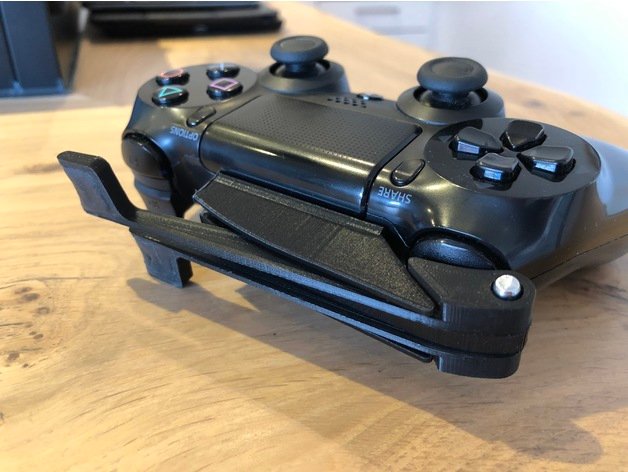
This is a non-destructive adaptation for the PlayStation 4 DualShock controller to use the left shoulder buttons with the right hand ? should also work reversed if you mirror it in your slicer software.It is also designed for shooters where you push L1 to aim
- Model code
- 1727
5.00 USD
Pay with USDT or USDC. We check your payment and send the files to your email or Telegram.
ABOUT THIS MODEL
Description & specifications
This is a non-destructive adaptation for the PlayStation 4 DualShock controller to use the left shoulder buttons with the right hand ? should also work reversed if you mirror it in your slicer software.It is also designed for shooters where you push L1 to aim (push the L1 extension gently) and R1 to shoot (push the L1 extension firmly) ? the L1 extension is long enough to also press R1 indirectly.Attaching the adaptation to your controller is rather simple. Use a double-sided foam tape (2 mm thick) to attach the body first and then add both extensions for the shoulder buttons. I used a metal pin for better movement, but I also added a part to print if you prefer that (not tested). Proper placement of the body is necessary for the buttons to work smooth, if you have trouble have a look at the picture I uploaded.I added some Sugru to my printed extensions for a nicer touch, but this is optional I guess. ?The adaptation is successfully tested with Red Dead Redemption 2, played by me (SCI C3). Let me know if you have questions or requests, I?m happy to help.Print SettingsPrinter Brand:AnycubicPrinter:All-metal MegaRafts:YesSupports:NoResolution:0,2Infill:25%Credits:Madvillain2 Rate this 3D modelDownload 3D modelsFileFile size PlayStation_4_Dualshock_Shoulder_Button_Adaptation499 KB
PlayStation 4 Dualshock Shoulder Button Adaptation free 3d print model download