3D model download
Modular USB and SD organiser free 3d print model download
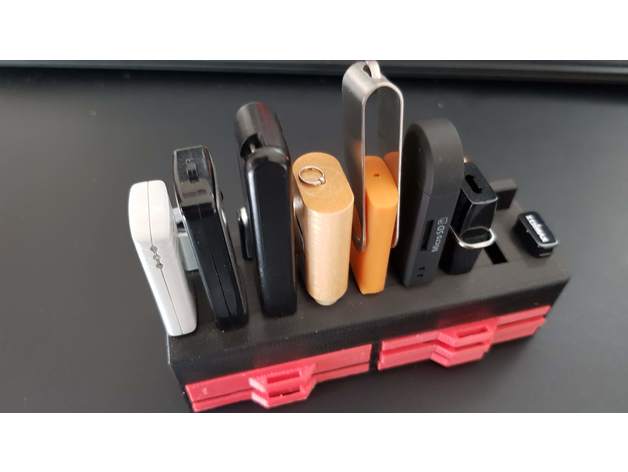
USB & SD card holderThis was one of the very first things I designed when I started 3d printing so it?s not perfect and therefore I never uploaded it here. But since I?ve been using it for two years, I have really grown fond of it. It meets my needs perfectly
- Model code
- 1699
5.00 USD
Pay with USDT or USDC. We check your payment and send the files to your email or Telegram.
ABOUT THIS MODEL
Description & specifications
USB & SD card holderThis was one of the very first things I designed when I started 3d printing so it?s not perfect and therefore I never uploaded it here. But since I?ve been using it for two years, I have really grown fond of it. It meets my needs perfectly so I though I?d share it anyway. ?The holder fits 9 USB-sticks and has 5 places on the back to put USB caps if needed. (Not all caps will stay in place as some are larger than the standard usb size)TolerancesThe tolerances for the drawers were designed narrow if I remember correctly. I strongly recommend printing some tests to see what works before you waste filament printing the holder or all the drawers! Don?t make the same beginner mistake I did, thinking I could scale the drawers down if they didn?t fit the holder. Shrink them too much and the SD cards won?t fit in their slots anymore. (duh) In my print there is some give and the cards are a bit loose in their slots so you might get away with printing the drawers at 99% if needed.DrawersThere are four drawers: Large drawer: you have to print 1 and only 1 of this type. It has no slots and is designed to be a general drawer. Small 2 sd drawer: slots for 2 regular SD cards (or adapter) Small combi drawer: slots for 1 regular SD card (or adapter) and 3 micro SD cards Small micro sd drawer: slots for 8 micro SD cards You need four small drawers in total.Print SettingsPrinter Brand:MonopricePrinter:Maker Select PlusRafts:NoSupports:YesResolution:0.2Filament: GeeTech PLANotes:Choose whatever infill you think is best. I was very inexperienced with 3D printing when I printed this so I went for 50% which is most likely overkill. I recommend printing the holder with its back on the bed. That way you only need supports for the USB cap holders. Supports are also needed for the big drawer handle (assuming you print it bottom on bed)Credits: 3dprintednickname Rate this 3D modelDownload 3D modelsFileFile size Modular_USB_and_SD_organiser455 KB