3D model download
Keyboard Steps ? Adjust the Angle of Computer Keyboards free 3d print model download
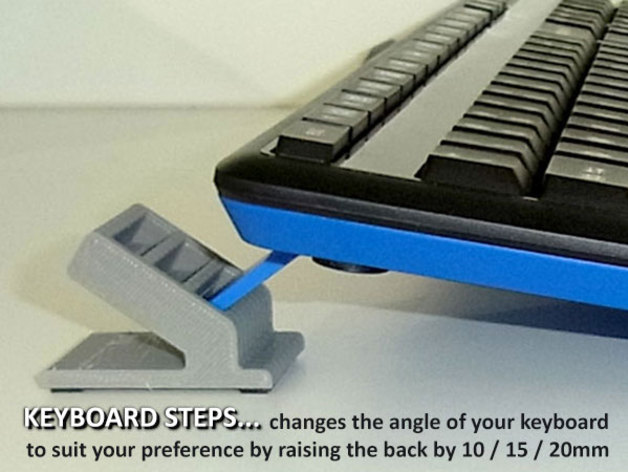
Many computer keyboards sit very flat on a desktop which a lot of people find uncomfortable even with the small legs on the back fold down. If you have a keyboard with rearward facing legs (up to 24mm wide) these Keyboard Steps could be the ideal solution to m
- Model code
- 2835
5.00 USD
Pay with USDT or USDC. We check your payment and send the files to your email or Telegram.
ABOUT THIS MODEL
Description & specifications
Many computer keyboards sit very flat on a desktop which a lot of people find uncomfortable even with the small legs on the back fold down. If you have a keyboard with rearward facing legs (up to 24mm wide) these Keyboard Steps could be the ideal solution to more comfortable use of your Keyboard.Keyboard Steps are just that? a stair case for your keyboard that raises it by 10 / 15 / 20mm to suit you personal preference. They are super easy to use? just insert the rear legs of your keyboard into the keyboard step (height) of choice. They support the back of the keyboard to raise the angle /tilt it forward.Keyboard Steps are a quick and easy print. As most keyboards have rubber pads to stop them sliding during use it is recommended to apply some adhesive backed rubber pads to the base of your Keyboard Steps for the same reason.Before printing check you have a keyboard with rearward facing legs (refer to images) up to 24mmwide. This is a very common type of keyboard.Note: If you like this check out the rest of my fun and practical designs. . Print SettingsPrinter Brand:MakerBotPrinter:MakerBot Replicator (5th Generation)Rafts:Doesn?t MatterSupports:NoResolution:0.20mm / StandardInfill:20% infill / 2 shellsNotes:Easy prints?.raft makes removal from the build plate easier. No support required. Post-PrintingAdd rubber pads?As the back of the keyboard will be raised with the Keyboard Steps in place the original rubber pads may not make contact with the desk as usual. For this reason it is recommended to add some thin adhesive backed rubber pads under the feet of your Keyboard Steps (Refer images).Credits:muzz64 Rate this 3D modelDownload 3D modelsFileFile size Keyboard_Steps_-_Adjust_the_Angle_of_Computer_Keyboards691 KB
Keyboard Steps ? Adjust the Angle of Computer Keyboards free 3d print model download