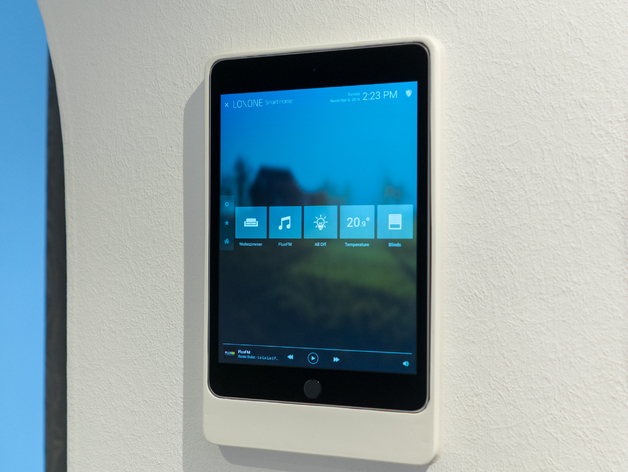
3D model download
iPad Mini 4 Wall Mount free 3d print model download
I wanted to use my iPad Mini 4 as a smart home controller so I started looking for wall mounts online. Most available options were prohibitively expensive and somewhat over-engineered. I wasn?t too keen on prying an iPad-sized hole into my wall just so you can
- Model code
- 2525
5.00 USD
Pay with USDT or USDC. We check your payment and send the files to your email or Telegram.
ABOUT THIS MODEL
Description & specifications
I wanted to use my iPad Mini 4 as a smart home controller so I started looking for wall mounts online. Most available options were prohibitively expensive and somewhat over-engineered. I wasn?t too keen on prying an iPad-sized hole into my wall just so you can put a glass pane over it. I couldn?t find anything that fit my requirements so I started designing my own wall mount.This is a pretty simple design that hides a regular wall socket mounting box with a USB power supply (see Custom section) so it keeps the iPad powered.Since my printer only has a 20?20 cm build surface and the wall mount is well over 20 cm in length, I had to split it up into two parts. I uploaded the files for both the complete version and the two-part version.Print SettingsPrinter:Wanhao Duplicator 6Rafts:NoSupports:YesResolution:Medium setting in Simplify3DInfill:40%Notes:I used clear PLA that came with the printer. Post-Printing Sand down the edges of the joint until the two parts fit together adequately Glue the pieces together with regular superglue Apply a coat of epoxy resin to the joint and the outer surfaces of the completed part and let it harden for about 24 hours. Wet-sand every surface. I used 220, 400 and 600 grit sandpaper until everything was smooth. Apply a coat of primer and several coats of spraypaint. Let it dry for 24 hours.NOTE: The iPad is held in place by friction only. If you apply too many layers of spraypaint to the inside edges it may fit a bit too snugly. I thought about holding the iPad in place with magnets but that?s still on my TODO list. Custom SectionFor the power supply I used the little 10W power brick that?s included with the iPad. You can remove the mains plug which is connected to the power brick with an IEC 60320 C8 socket. At least in Europe, that is. I just cut up an IEC 60320 C7 cable, plugged it into the aforementioned socket and hooked it up directly to the mains wires in the wall socket mounting box.Credits:fiendie Rate this 3D modelDownload 3D modelsFileFile size iPad_Mini_4_Wall_Mount370 KB